

Installation, Setup & Machine Activation
ScrollClip Studio is a native, standalone workstation application built for macOS and Windows 10/11. All video processing, audio leveling, and speaker tracking run 100% on your local machine with zero cloud delays.
Workstation Activation Dialog
On first launch, ScrollClip displays the Activation Modal. Enter your checkout email and your lifetime license key (SC-PRO-XXXXXXXX-XXXX).
- Cryptographic Binding: Generates a local hardware fingerprint token stored in your secure system keystore.
- 100% Offline Capable: Once activated, you can render unlimited videos completely offline.
Automated Setup Check
ScrollClip automatically verifies that your core media engine, neural speech recognition weights, and face vision tracking models are ready:
Settings Page — Complete Parameter & Button Reference
Accessible anytime via the Settings icon in the navigation rail, the settings panel contains 6 dedicated tabs:
1. General Settings
Control Theme Mode (Dark, Light, System), Seed Accent Color (generates all 30+ Material Design 3 tokens), Hardware Acceleration switch, Auto-Updates switch, and Default Export Directory browser button.
2. Processing & AI Settings
Configure Default Clip Duration (⚡ Smart, 15s, 30s, 60s, 90s, 120s, 150s), Default Language (Auto-Detect + 12 specific choices), Google Gemini API Key with "Fetch Live Models" button, Framing Mode (Face Tracking vs Centered Crop), and YouTube Cookies import for protected videos.
3. Subtitle Styling Settings
Choose default preset (MrBeast, Hormozi, Neon, Minimalist, Karaoke), font family, font size slider (24px–96px), active word highlight color, outline width, vertical positioning (Top, Center, Bottom with Y-offset slider), and animated emoji toggles.
4. Performance & Hardware Acceleration
Select Hardware GPU Engine (Apple Silicon Metal GPU, Dedicated PC GPU, or High-Efficiency Software Mode), run the "Test GPU Hardware" diagnostic benchmark, and set CPU thread allocation (1 to 16 cores).
5. Storage & Cache Management
Inspect visual storage breakdown across Video Cache, Audio Cache, Temporary Renders, and AI weights. Click "Open Cache Folder" to reveal files in Finder/Explorer, or click "Clear Cache" to safely purge temporary render chunks.
6. License & Workstation Management
Displays your masked license key with 1-click copy, active workstation quota (e.g. 1/1), "Ping License Server" heartbeat, and "Deactivate Workstation" button to release your seat when migrating to a new machine.
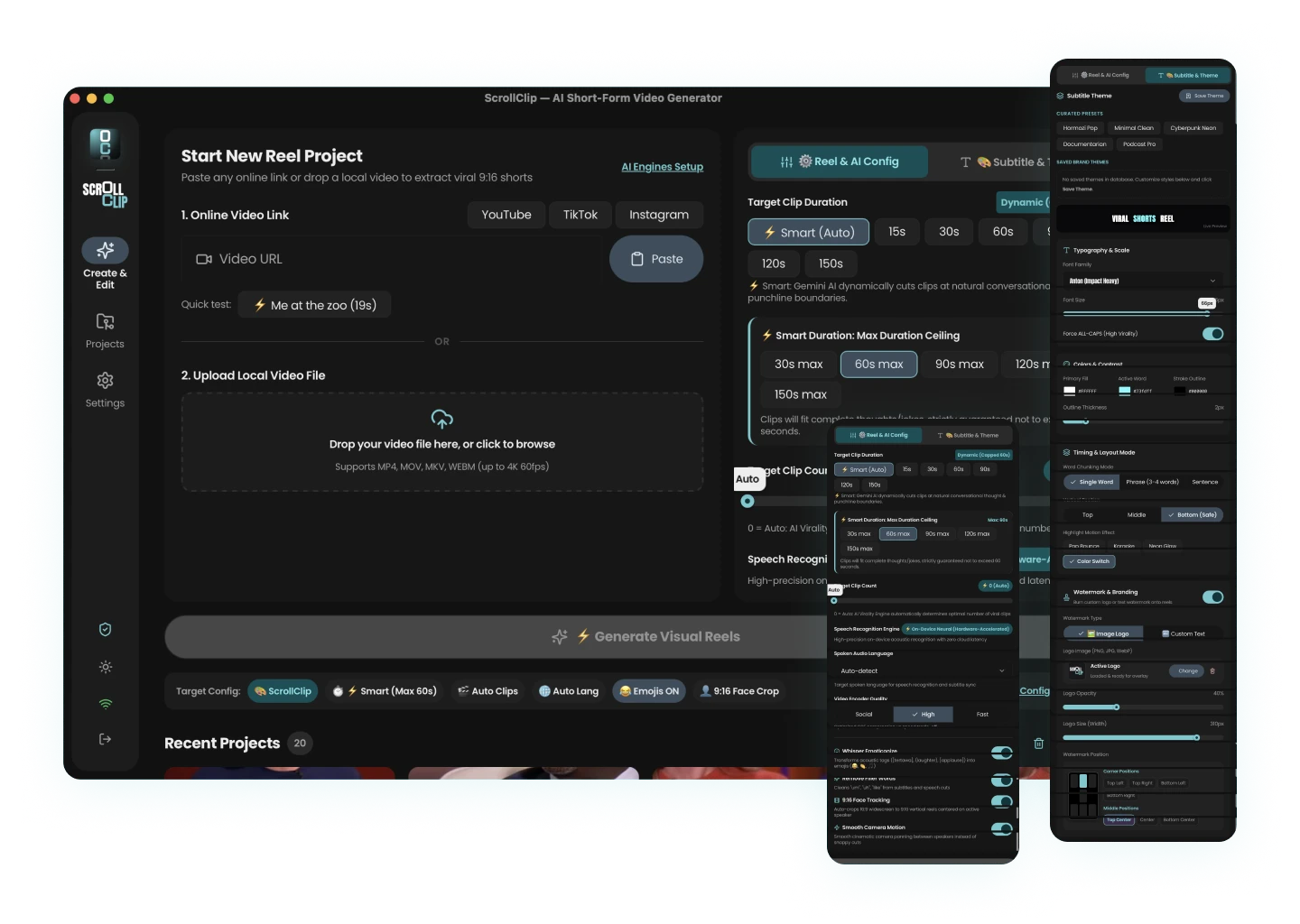
Project Ingestion & Configuration (Input Step)
The creation step provides two seamless methods to bring in footage:
Paste any YouTube video link. Click "Paste from Clipboard" to instantly load streams without opening a browser.
Drag and drop master videos (.mp4, .mov, .mkv, .webm) up to 4K resolution at 60 frames per second.
Media Inspection Probe: ScrollClip immediately inspects the video resolution, duration, framerate, and audio channels to ensure optimal framing calculation.
Configuration Sidebar: Select target clip duration (Smart Auto or fixed 15s–150s), set clip count slider (0 = AI decided), enable dynamic face tracking, and click "Generate Viral Reels".
The 5-Stage Automated Processing Pipeline
ScrollClip executes a synchronized 5-phase pipeline locally on your computer:
Review & Multi-Clip Selection
Clips are ranked automatically by retention probability:
Click the Pencil Icon ("Edit Reel") to open the full Editor Studio, or click the Folder Icon to reveal the file in your OS explorer.
The Full Editor Studio
The Editor Studio gives you complete authority over kinetic subtitles, canvas preview modes, and export queues:
WYSIWYG Mode renders kinetic captions live on an interactive DOM canvas. You can change fonts, colors, and word timings in real time with zero render waiting. When you are ready, switch to Rendered Mode to preview the finalized video file.
Click any word chip to jump the video scrubber directly to that frame. Double-click to edit text, correct names, or adjust punctuation. Press Enter to split a caption line, or press Delete to remove filler words.
Clicking "Rerender with New Styles" re-burns subtitles using existing cached tracks and face tracking data. Your updated video is rendered in seconds without re-processing the original file.
Troubleshooting, Pro Tips & Support
- Apple Silicon (M1/M2/M3/M4): Operates natively via Metal pipelines with zero driver configuration.
- Windows NVIDIA/AMD: Keep your GPU drivers updated to take advantage of high-speed hardware video encoders.
- Age-Gated YouTube Videos: Import a standard
cookies.txtfile via Settings → Processing & AI.
Dedicated Customer Assistance
Have questions about activation, hardware configuration, or feature updates? Choose between our two direct support channels: